
Handling an incident
Log it while it is still confusing, triage it, resolve it — and if you are in scope for DORA, start the clock before you have all the answers.
Incidents in the sidebar is the register of things that actually happened: security events, near misses, outages, vendor failures.
Log one
Section titled “Log one”New incident asks for very little, on purpose — the moment to record an incident is while it is still unfolding, not once it is understood.
-
Summary. A clear title and a description of what happened and when.
-
Triage. Priority, an owner in Assigned to, and a due date for the target resolution. The related vendor, if one is involved — that is what puts the incident on the vendor’s own record, where the next person assessing them will see it.
-
Impact. Business impact, and clients affected.
Work it
Section titled “Work it”An incident moves through Acknowledge → Resolve → Close, and can be reopened. The transitions ask for the things you will want later and will not remember otherwise: root cause, resolution summary, lessons learned and improvement actions.
Each transition is timestamped — created, acknowledged, work started, resolved, closed. Those timestamps are your response-time evidence, and they are captured because you worked the incident rather than because someone kept a log.
The DORA classification
Section titled “The DORA classification”If your organization is in scope for DORA, an ICT-related incident has to be assessed against the classification criteria, and a major one carries statutory reporting deadlines.
Open the incident’s DORA impact assessment. Vendorica works the seven criteria of RTS (EU) 2024/1772 — C1 clients, counterparts and transactions; C2 reputational impact; C3 duration and downtime; C4 geographical spread; C5 data losses; C6 critical services affected; C7 economic impact — showing each threshold, your assessed value, and whether it is met. Estimates are allowed and can be marked as such; the alternative to an estimate is usually silence.
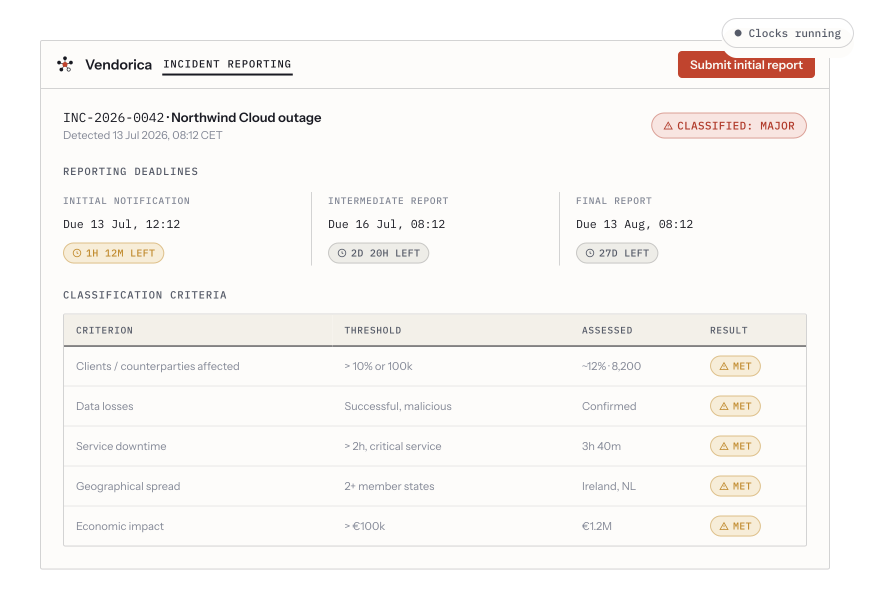
A classified major incident: the criteria as a table of threshold, assessed value and result, with the initial, intermediate and final reporting deadlines running as countdown clocks.
If it classifies as major, the RTS (EU) 2025/301 deadlines run as countdown clocks: initial, intermediate and final. The clocks are the useful part — the deadline that gets missed is almost never the final report, it is the initial notification, whose window is short and starts before anyone feels ready.
From the same place you can generate the report itself: pick the report type, preview the file, download it, and record it as submitted.
Afterwards
Section titled “Afterwards”Two habits close the loop:
- Check the risk register. If the incident matches a scenario you had scored, your residual score was wrong — update it. If it matches nothing, write the scenario. See Registers and scenarios.
- Turn the improvement actions into work. A lessons-learned field nobody actions is the compliance equivalent of a shrug; raise a finding with an owner and a date.