
Registers and scenarios
A register is a folder with a purpose; a scenario is a sentence about something that could happen. Both are easier to get right than they look.
The Risk group has six pages. Two of them do most of the work: Registers (where scenarios live) and Overview (what they add up to).
Registers
Section titled “Registers”A risk register is a named collection of scenarios. Most organizations start with one — mark it as the default — and split later when a second audience appears: an ICT risk register the CISO owns, an operational one the COO owns, a group-level one that consolidates.
Create one from Risk → Registers with Add register. Scenarios can be moved between registers afterwards, so an early wrong guess is cheap.
Write a scenario
Section titled “Write a scenario”Add scenario opens a two-step dialog: Identify, then Score.
-
Title. A sentence, not a noun. “Ransomware” is a category; “Ransomware encrypts the primary claims database and backups are unusable” is a scenario. The second one can be scored; the first cannot.
-
Description. What event could happen, and how would it hurt the organization. Two or three sentences.
-
Register and category, so it lands with its peers.
-
Risk type — the CIA triad: confidentiality, integrity, availability.
-
Score it — inherent, then residual. See Scoring, treatment and appetite.
You can Save as draft at any point. A half-written scenario in the register beats a complete one in someone’s notebook.
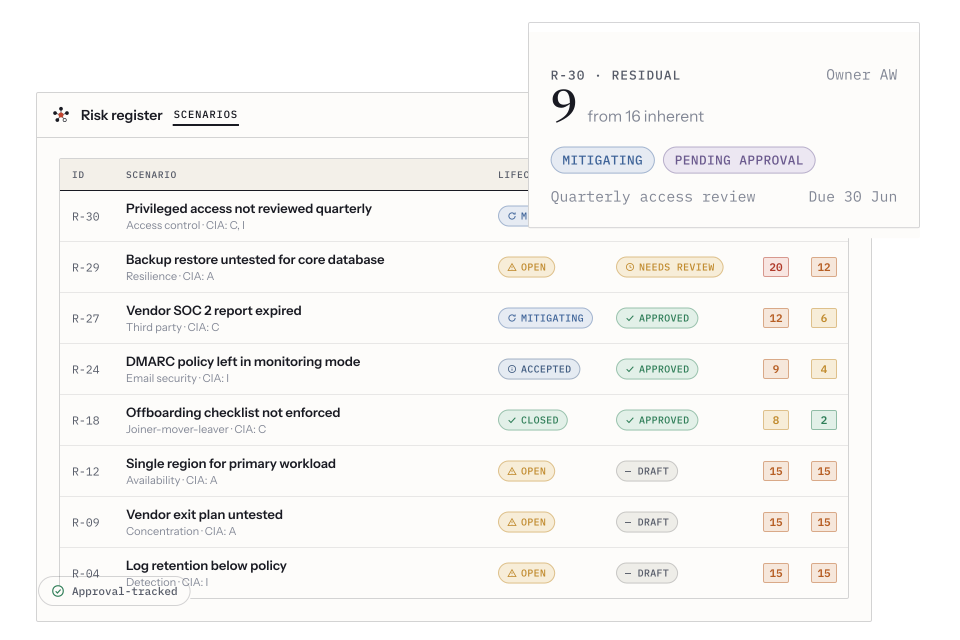
The register: scenarios with their own IDs, lifecycle and approval status, and inherent versus residual scores side by side.
Two status columns, and they are not the same thing
Section titled “Two status columns, and they are not the same thing”Every scenario carries both:
- Lifecycle — where the risk is: Open, Mitigating, Accepted, Closed.
- Approval — whether the entry has been through your review workflow.
They are deliberately orthogonal. A risk can be actively mitigated and not yet approved, or approved and still wide open. Collapsing them into one column is the most common way a risk register starts lying.
Start from the library
Section titled “Start from the library”Risk → Library is a catalogue of scenario templates drawn from the frameworks. Filter it by framework, and use it as a prompt rather than a shopping list: the value is in noticing the three you had not thought of, not in importing sixty you will never review.
Keeping the register honest
Section titled “Keeping the register honest”- Archive rather than delete. The filter defaults to active only; the history stays.
- Snapshots (Risk → Snapshots) freeze the whole picture on a date, so you can show how risk moved between two board meetings rather than asserting it.
- Indicators (Risk → Indicators) are the KRIs — measured numbers with thresholds, which is what stops a quarterly re-score from being a vibe.