
Audits and findings
Give the auditor their own door, answer their requests in one place, and let what they raise become work with an owner and a deadline.
Compliance → Audits manages external audit engagements. The point of running one here rather than over email is that the evidence the auditor sees is the evidence in your control library — not a folder someone assembled by hand and will assemble again next year.
Create an engagement
Section titled “Create an engagement”-
New audit engagement opens a four-step wizard: Framework, Scope, Auditors, Review.
-
Framework — what is being audited against.
-
Scope — which controls, functions or units are in scope. Narrow scope is a kindness to everyone, including the auditor.
-
Auditors — the people who will receive an invite when you kick off. They can also be added later from the engagement itself.
-
Review, then Create engagement. It starts as a draft.
Kick off when you are ready: that is what sends the invites and opens the auditor’s access. An engagement runs Draft → Active → Observation → Concluded, and can be archived afterwards.
The information request list
Section titled “The information request list”The IRL tab is the request queue — the prepared-by-client list. Each item carries a request, an owner and a status: Open, Provided, Accepted, Closed.
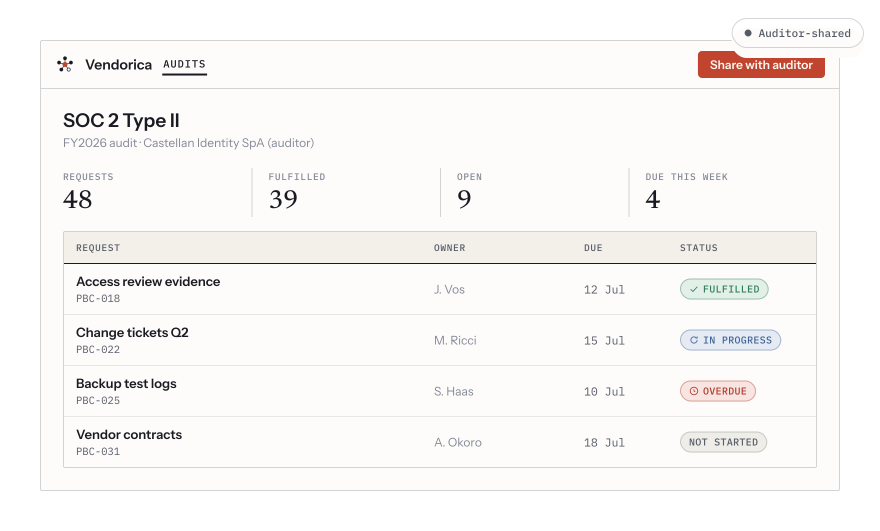
The evidence-request tracker: requests, who owns each one, when it is due, and how many are still open.
Answer an item with Attach evidence — from your existing evidence library, so what the auditor receives is the same artefact your control is proven by, not a copy of it. Then Mark provided; the auditor accepts or reopens.
What the auditor sees, and what you see them do
Section titled “What the auditor sees, and what you see them do”Auditors get a portal of their own, scoped to the engagement. Use Preview as auditor before kicking off to check what is exposed — it is much cheaper to find an over-broad scope from your own chair.
Everything they do is recorded on the Activity tab: every engagement, control and evidence item viewed, every download, every request accepted or reopened. Nobody has to keep notes on this.
Findings
Section titled “Findings”Compliance → Findings is the cross-domain register: an observation with an owner, a deadline and proof it was closed. Findings arrive from three places — an audit engagement, a failed control test, or a person raising one by hand (including from a vendor assessment).
A finding runs Open → In progress → Resolved, and can instead be closed as Risk accepted, with a rationale. A resolved finding can be verified by someone other than the person who fixed it, and reopened if the fix did not hold.
Corrective and preventive actions
Section titled “Corrective and preventive actions”Under a finding you open actions — corrective (fix this instance) and preventive (stop it recurring). Actions are tasks: they appear in My Tasks, carry due dates, and follow the same reminders and escalation as any other work.