
Keeping the register clean
Two findings lists — what is missing, and what is in there twice — and why the second one matters more than it looks.
Every regulatory output you will ever produce is a projection of the vendor register. Vendors → Data quality is the page that tells you whether that register can carry the weight, and it has two tabs.
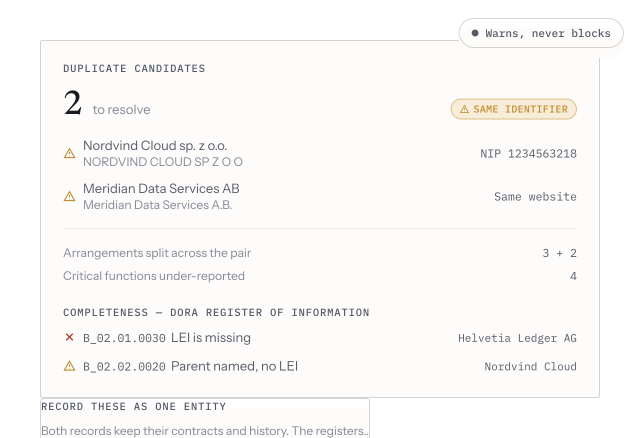
A duplicate candidate matched on a shared registration number — both spellings of one supplier — alongside completeness findings citing the exact fields each counterparty is missing.
Completeness
Section titled “Completeness”The first tab lists, per register, the fields a vendor is missing to be reportable — with a severity, the vendor, and the specific field code the finding cites. Not “this record looks thin”, but this vendor has no legal identifier and the Register of Information requires one.
Fix them by editing the vendor. The finding clears on its own.
Work it in severity order and stop when the list is boring. Completeness is not a score to drive to zero — a field that no register you file actually needs is not worth an afternoon.
Duplicates
Section titled “Duplicates”The second tab lists duplicate candidates: two or more records the product believes are the same legal entity, with a confidence level and the basis it matched on — a shared registration number, a near-identical name, a shared domain.
Each candidate takes one of two decisions:
- Same entity — records them as one counterparty.
- Not a duplicate — dismisses the candidate so it stops being offered.
Either decision is reversible with Undo, and either is recorded. Leaving it undecided is the only option that costs you something.
Catching them at the door
Section titled “Catching them at the door”When you add a vendor that looks like one already in the register, Vendorica says so on the form — this counterparty is already in your register — before you save. Duplicates most often arrive when a supplier is already present as a fourth party, discovered through someone else’s subprocessor chain. Record your direct relationship on the existing row instead of creating a new one.
When to look
Section titled “When to look”- After every bulk import. It is the fastest read on how well the mapping landed — see Importing your data.
- Before building a Register of Information, not after. Both failure modes above surface as filing errors otherwise, at the least convenient moment.