
Screening and monitoring vendors
Two continuous feeds on orthogonal questions — who your counterparty is, and how well they are holding up.
An assessment is a point in time. These two are the feeds that keep running between assessments, and they answer different questions: screening asks who you are dealing with, monitoring asks how they are doing.
Screening — sanctions, PEP and adverse media
Section titled “Screening — sanctions, PEP and adverse media”Vendors → Screening holds watchlist matches across your vendors: sanctions lists, politically exposed persons, adverse media and enforcement actions.
Run a screening from a vendor’s screening page with Screen now, or from the register for a vendor you have not screened yet. Each run is kept, newest first, so the history is the evidence that you were looking.
Adjudicate every match
Section titled “Adjudicate every match”A match is a candidate, not a verdict, and name-matching produces false positives by design — that is the price of not missing the real one. Each match takes a decision:
- Confirm match — this is our counterparty.
- Dismiss — it is not, with a note saying why.
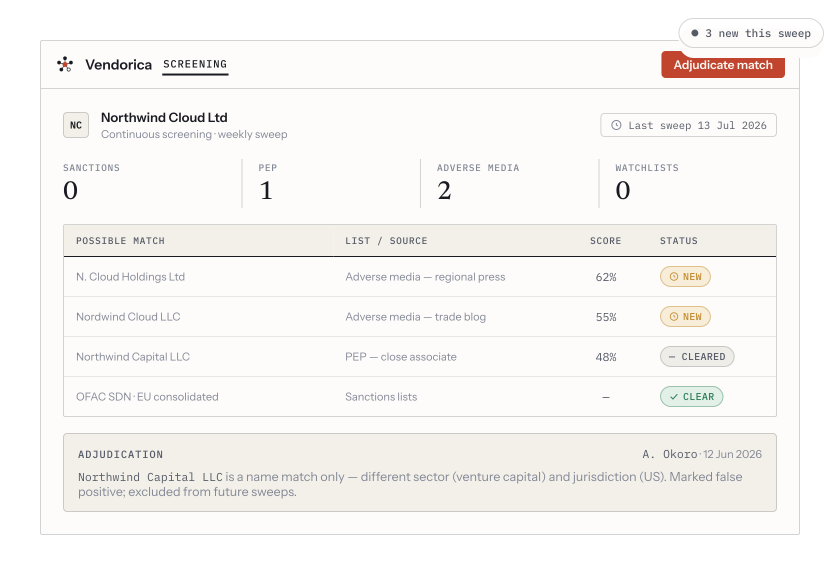
Continuous coverage across sanctions, PEP, adverse-media and watchlist categories, with a documented rationale on a dismissed false positive.
The note is the point. “Different company, wrong country, no overlap in directors” written today is what makes the decision defensible in two years, when nobody remembers it. Adjudications carry forward to later runs, so you dismiss a given false positive once rather than every month.
Monitoring — security ratings and breach alerts
Section titled “Monitoring — security ratings and breach alerts”A vendor’s Monitoring tab carries external security ratings, normalised to a 0–100 scale so providers can be compared, a 90-day trend, and any breach alerts the provider flags.
Setting it up takes two steps, both on the Vendors → Monitoring admin page (it is the Vendor monitoring settings tab, linked from the sidebar so you do not have to hunt for it):
- Connect the provider in Integrations — the credentials are your organization’s own, not ours.
- Map your vendors to the provider’s records. There is a domain lookup that finds the right listing rather than matching by name.
Then set the alert threshold: how far a normalised score has to drop before a downgrade alert fires. Start looser than feels right. A threshold that fires weekly gets muted, and a muted alert is worse than no alert.
Where this shows up
Section titled “Where this shows up”Both feeds surface on the vendor itself — its own screening and monitoring tabs — and both feed the inherent-risk picture at Vendors → Risk, which bands your portfolio and shows what is unscored, stale or above threshold.