
Building and filing your register
The Register of Information is built, checked, signed off and exported — six screens, in that order, and none of them is a spreadsheet.
Registers of Information explains what the register is and where its content comes from. This is the workspace that produces one — the DORA RoI group in the sidebar, six pages, each with a job.
Register — the builder
Section titled “Register — the builder”Build snapshot materialises the register from your live vendor, contract, function and asset data. It is a snapshot: a point-in-time capture you can inspect, sign off and file, rather than a live query that changes underneath a submission.
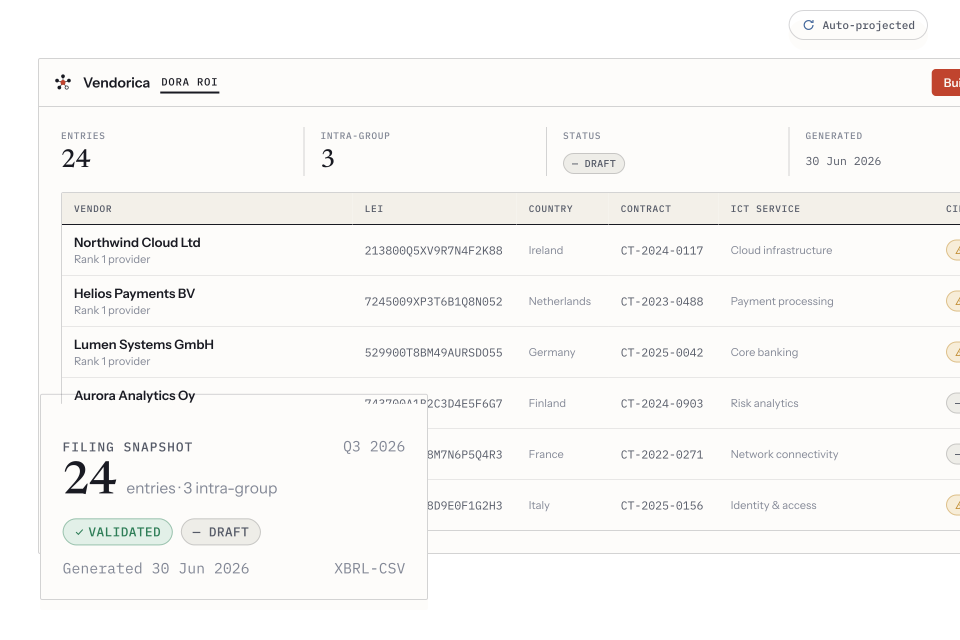
The builder: one row per arrangement, with the counterparty, its LEI, the contract and the ICT service it provides.
Every row can be annotated, and the annotation drawer is where the
judgement calls live: the business functions the arrangement supports,
the exit plan, and the sub-contractors behind it. The CIBF column —
critical or important business function — is the one supervisors read first,
and it comes from those function links rather than from the vendor’s
criticality tier. The two are different questions; see
DORA.
Functions and concentration
Section titled “Functions and concentration”Functions is the outsourced-functions register: which of your business functions are supported by which arrangements. Nothing appears here until functions are linked on a contract or a sub-contractor, which is why the builder can look emptier than your estate.
Concentration answers Article 28(4): where you have a single point of failure. It scores providers by how many arrangements they hold, how many touch critical or important functions, and how many are non-substitutable — and then does the same one level down.
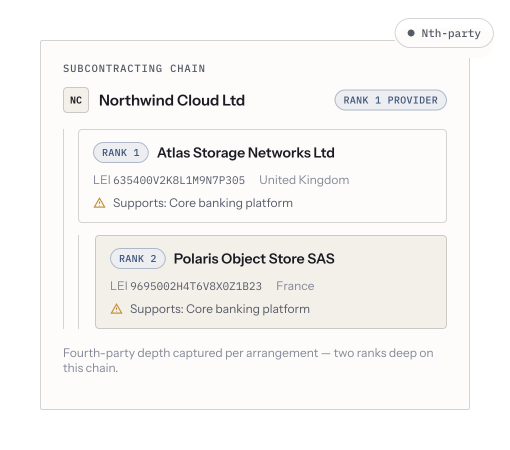
The sub-contracting chain. Concentration you can see is rarely the dangerous kind; the fourth party three of your providers quietly share is.
Before you file
Section titled “Before you file”-
Run the LEI check. Every LEI in the register is validated against the GLEIF global registry. A mistyped or lapsed LEI is the most common reason a package is rejected, and it is trivially fixable — before submission.
-
Read the completeness check and fix the records, not the export.
-
Check the filing profile under the group’s Settings. It carries your own entity’s details for the filing — the fields the package needs about you rather than about your providers.
-
Sign off the version. On Versions, a built snapshot moves from draft to signed off, with who signed and when. That is the act of saying this is the register you stand behind.
-
Export. The package is generated in the EBA’s xBRL-CSV shape.
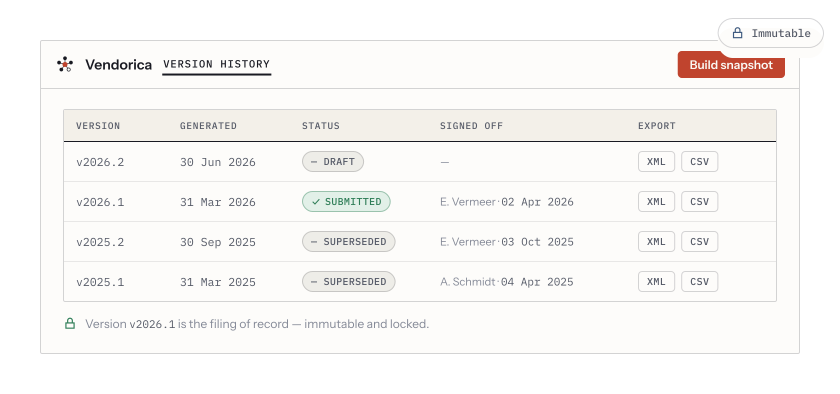
Version history: every snapshot, when it was generated, who signed it off and what was exported.
Versions are the point
Section titled “Versions are the point”Keep every snapshot. Two of them, compared, answer the question a supervisor actually asks — what changed since your last filing, and why — and they answer it from the record rather than from memory. A register you rebuild from scratch each year has no such answer.
If you have filed before
Section titled “If you have filed before”Import the package you filed and Vendorica rebuilds vendors, contracts and functions from it — see Importing your data. For most entities this is the fastest possible start, because a filed register is already the reconciled version of the estate.