
Registers of Information
DORA's Article 28(3) register — what goes in it, where each field comes from, and how to produce one you can defend.
Article 28(3) of DORA requires every financial entity to maintain a register of information covering all its contractual arrangements for the use of ICT services, and to make it available to its competent authority on request. Authorities have been collecting them annually.
It is a structured return, not a narrative document: a set of related tables with prescribed fields, identifiers and code lists. Most of the difficulty is not writing it — it is that the data has to be complete, internally consistent, and traceable to something real.
Where the content comes from
Section titled “Where the content comes from”A register is assembled from what you already keep:
- Your entity details — who is filing, under which identifiers.
- The arrangements — your contracts, their dates, terms and service types.
- The providers — your vendors, with their legal identifiers and country of registration.
- The functions supported — which business functions each arrangement serves, and whether those are critical or important.
- The chain beneath them — the sub-contractors your providers rely on.
Nothing here is register-specific data entry. If your vendors, contracts and business functions are in good order, the register largely writes itself; if they are not, the register is where you find out.
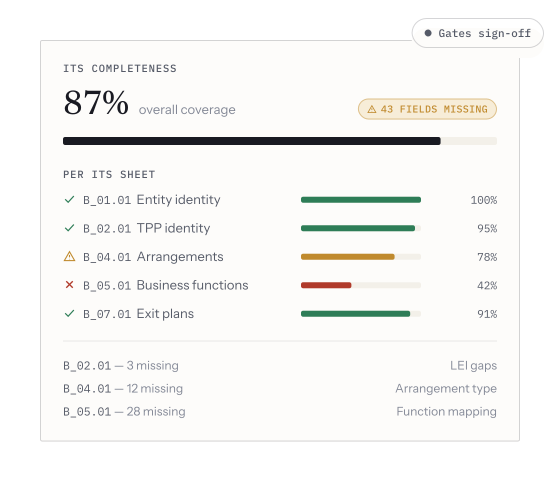
The completeness check, scored per ITS sheet. This is the screen worth opening early: it tells you what is missing while there is still time to fix the records rather than the export.
Producing one
Section titled “Producing one”-
Make sure your business functions are classified. The register asks which functions each arrangement supports and whether they are critical or important. Arrangements with nothing attached cannot be placed.
-
Check your vendors carry legal identifiers. Registers are keyed on formal identifiers rather than names — a provider recorded only as “AWS” cannot be reconciled by a supervisor.
-
Check contract dates and service types. Start and end dates, notice periods and the type of ICT service are all reported fields.
-
Generate the register, review what it reports as incomplete, and fix the underlying records rather than the output. A register edited by hand after export disagrees with your own system the moment anything changes.
-
Export and submit in the shape your authority asks for.
Why you should not hand-edit the export
Section titled “Why you should not hand-edit the export”It is tempting, and it costs you the property that makes the register worth having: that it is a view of your live data. A hand-edited export is a point-in-time document that starts drifting immediately, cannot be regenerated, and will disagree with the next one you produce — which is exactly the inconsistency a supervisor is looking for. Fix the record, then regenerate.