
Policies
Draft, approve, publish, review — and the version that was live last April is still there when someone asks.
Compliance → Policies is the library: name, category, owner, published version, lifecycle state, review cycle and next renewal date.
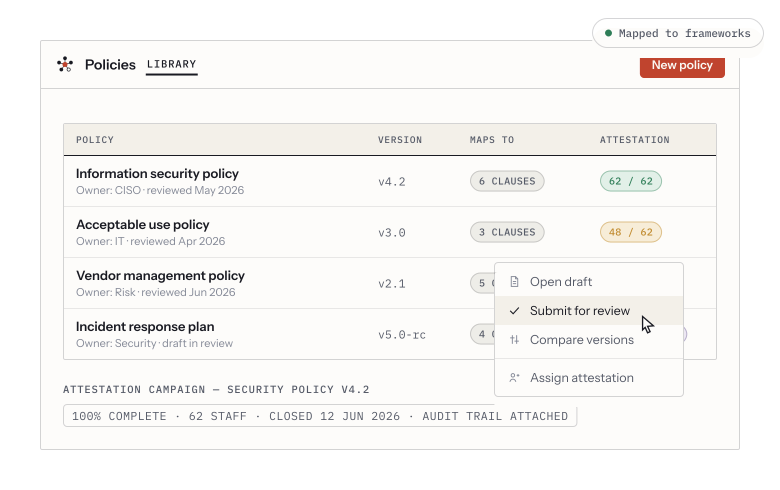
A versioned policy library mapped to framework clauses, with attestation campaigns and per-row actions.
Create one
Section titled “Create one”New policy offers two starting points:
- From template — one of the seeded policy templates, body pre-filled and ready to tailor. Start here unless you have a reason not to; editing a serviceable draft is faster than facing a blank page, and the structure is the part most people get wrong.
- Blank — an empty shell you write from scratch.
Either way you land in the editor with a rich-text body, headings, lists, tables and links.
The lifecycle
Section titled “The lifecycle”-
Draft. Yours to edit freely.
-
Submit for approval, choosing the approvers. The policy moves to Pending approval and the approvers are asked.
-
Approved, or Rejected with a reason. A rejection returns it to you with the reason attached, rather than silently.
-
Published. This is the version that counts — the one people are held to and the one an auditor is shown.
To revise a published policy, use New version. The published text stays live while the revision is drafted and approved, so there is never a window where your organization has no current policy. Earlier versions stay in the Versions panel and can be restored.
The review cycle
Section titled “The review cycle”A policy carries a review cycle, and the library shows the next renewal date — overdue, today, or in n days. When one comes due, a task is raised for its owner and appears in My Tasks like any other work. Filter the library by Renewal window to see what is overdue or due in the next 30 or 90 days.
Clause anchors
Section titled “Clause anchors”A policy documents a control, but a 40-page policy documents it in one paragraph. Clause anchors attach a control to that exact clause, from the policy editor, with the paragraph on screen.
The payoff is on the control’s Policies tab, which then shows not just “documented by the Access Control Policy” but the clause that does the documenting — which is what an auditor is actually asking to be shown.
Two states are worth knowing:
- Text changed since this anchor was made — the clause has been reworded. Re-read it before relying on it.
- Not in the published version — the clause has gone. That is a finding about your policy, not a broken record, and Vendorica will not tidy it away.
Attestation
Section titled “Attestation”Policies can be put to your people to read and attest to. Outstanding attestations appear for each person under their account, and per-person progress is visible on the policy — which is how “everyone has read the acceptable-use policy” stops being an assertion.