
Working with controls
An owner, a status and a piece of proof. Everything else on a control is detail hanging off those three.
Controls arrive from the framework you adopted. Compliance → Controls is the register of all of them; a control opens into tabs for Overview, Framework mappings, Evidence, Tests, Policies, Risk mitigations, Scoping, Commitments and Custom fields.
First, assign owners
Section titled “First, assign owners”A control with no owner is nobody’s. Select rows in the register and use Bulk assign to set an owner across a batch — on a freshly adopted framework, that is the whole list in a couple of passes.
Owners then have their own queue at Compliance → My controls, which is the same register narrowed to what they are accountable for. It is the page to send people to; the full register is for whoever runs the programme.
The status vocabulary
Section titled “The status vocabulary”Five words, and they mean exactly what they say:
| Status | Meaning |
|---|---|
| OK | Current evidence is attached |
| Needs evidence | Nothing proves this control today |
| Expiring soon | The evidence is about to age out |
| Expired | The evidence has aged out |
| Deactivated | Deliberately switched off, and excluded from rollups |
Needs evidence is the honest default for a newly adopted framework. It is not a failure — it is a to-do list that arrived pre-written.
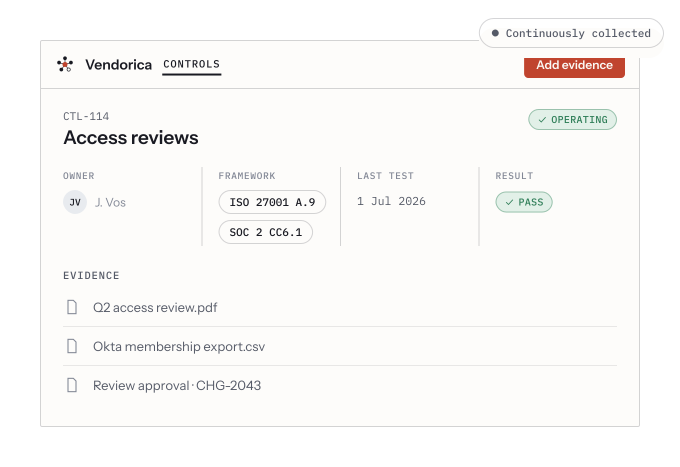
A control detail page: owner, mapped frameworks, last test result, and the evidence attached to it.
Automated tests
Section titled “Automated tests”A control’s Tests tab lists the automated checks bound to it. Where an integration is connected, a test reads the real configuration — group memberships, a policy setting, an export — and records a pass, fail, warning or inconclusive result, with the output kept as evidence.
You can Run now on any test rather than waiting for its schedule, which is the fastest way to see whether a fix landed. A failing test can be turned into a finding so it gets an owner and a deadline rather than sitting red.
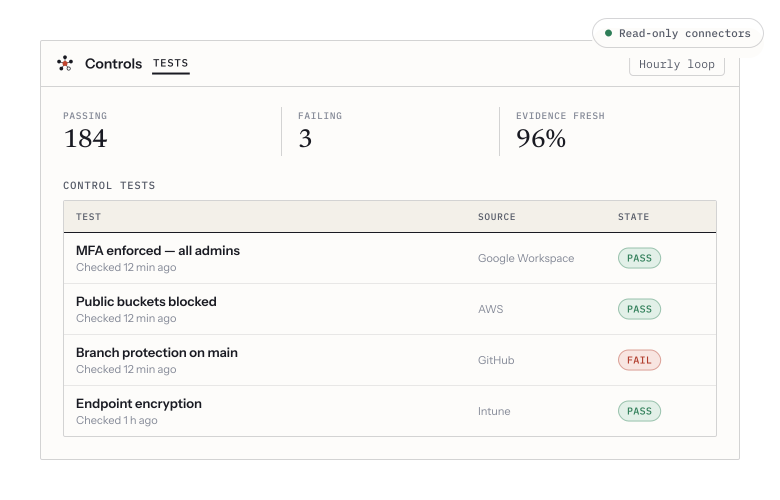
Automated tests fed by read-only connectors, with pass/fail state and evidence freshness.
Scoping a control to asset groups
Section titled “Scoping a control to asset groups”By default a control’s test run covers every asset of a matching type across the organization. The Scoping tab narrows it to chosen asset groups, and shows you the resolved asset list before you save — so “which servers does this actually test” is answered on screen rather than inferred.
Leave it org-wide unless you have a reason. Scope narrowly and a new asset outside the scope is silently untested, which looks exactly like a control that passes.
Policies and controls are two halves
Section titled “Policies and controls are two halves”A control’s Policies tab links the written policy that documents it, and — where the policy author anchored them — the exact clauses inside it. The distinction is worth holding on to: the policy is how the control is designed, the evidence is how it operates. An auditor asks for both.